How Our Two-Stage Bluetooth & Gaming Audio Latency Test Works
Measuring wireless headset lag in a browser requires separating your personal human reaction speed from hardware audio buffering. Single-stage reaction tools or fixed-offset timers guess how fast a person taps, mixing your finger reflex into Bluetooth delay and making wired-vs-wireless comparisons inaccurate.
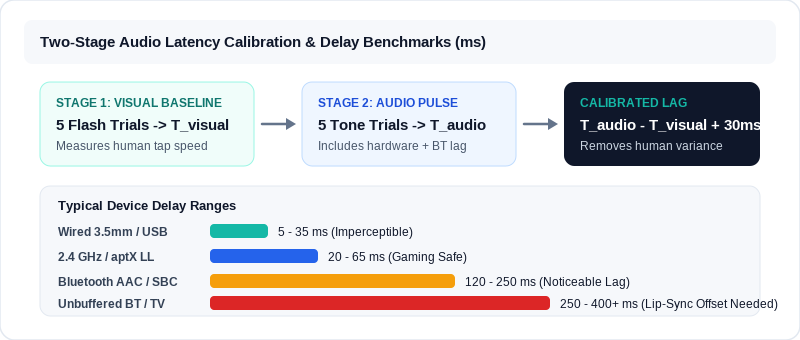
This audio latency test uses a calibrated two-stage human baseline method:
- Stage 1 — Visual Baseline (5 Trials): Click or press
Spacethe instant the reaction pad flashes teal. Five trials record your median visual-to-finger reflex speed (T_visual), eliminating personal fatigue and mouse/keyboard switch variance. - Stage 2 — Audio Pulse (5 Trials): Keep your eyes relaxed—there is no visual flash in Stage 2. Press
Spaceor tap the pad the moment you hear the crisp 1250 Hz ping (T_audio). That timestamp captures your reflex plus OS mixer, Bluetooth/wireless encoding, and driver delay. - Stage 3 — Calibrated Audio Lag (ms): In human neurobiology, pure auditory reaction time is roughly 25–35 ms faster than visual reaction time. Computing
Calibrated Lag = (T_audio - T_visual) + 30 msusing medians isolates true audio lag in milliseconds alongside your browser'sAudioContextoutput buffer reading.
Back-to-Back Headset Comparison (Retest Audio Only)
Start by completing Stages 1 and 2 on wired headphones as your reference baseline. Then put on your Bluetooth earbuds or 2.4 GHz gaming headset and click Retest Audio Only. Reusing your saved T_visual baseline lets you test multiple headsets in seconds and read the exact gaming lag penalty of each wireless codec.
Wireless & Bluetooth Latency Benchmarks (ms)
Compare your calibrated Bluetooth latency reading against typical connection tiers:
| Headset / Audio Pipeline | Typical Calibrated Lag | Gaming & Voice Suitability |
|---|---|---|
| 3.5mm Analog / Direct USB-C DAC | 5 – 35 ms | Best for competitive FPS, rhythm games, and real-time monitoring |
| 2.4 GHz USB Dongle / aptX Low Latency | 20 – 65 ms | Snappy response for wireless gaming with imperceptible delay |
| Bluetooth LE Audio (LC3) / aptX Adaptive | 40 – 95 ms | Solid for casual PC/mobile gaming and live voice calls |
| Bluetooth AAC (iOS / macOS) / aptX Classic | 110 – 190 ms | Fine for auto-synced apps, sluggish in rhythm or shooter games |
| Standard Bluetooth SBC | 150 – 260 ms | Noticeable audio lag behind gunshots, UI clicks, and keystrokes |
| Bluetooth Hands-Free Profile (HFP Call Mode) | 180 – 320+ ms | Heavy buffering + mono voice compression whenever mic turns on |
How to Cut High Bluetooth & Gaming Audio Lag
If your audio latency test reads above 90–100 ms during PC or mobile gaming, try these practical changes:
- Switch On Earbud Game / Low-Latency Mode: Most wireless earbuds hold a 180–240 ms buffer for music stability and drop to ~60–90 ms when Game Mode is toggled inside the brand's companion app.
- Avoid Bluetooth Mic Activation During Gaming: On Windows and macOS, opening any voice chat or game mic switches Bluetooth headphones from stereo A2DP to low-bandwidth Hands-Free Profile (HFP), increasing lag and degrading sound. Use a separate USB desktop mic or a 2.4 GHz dongle headset instead.
- Turn Off Heavy OS Audio Enhancements: Windows Spatial Sound, Dolby Atmos post-processing, and software equalizers add extra lookahead buffers. Confirm clean stereo first with our main Sound Test, check left/right driver orientation in the Headphone Test, or test sub-bass down to 20 Hz on the Bass Test.
If you only need to align out-of-sync movie dialogue or streaming tracks inside VLC, OBS, or smart TV audio menus rather than testing interactive headset lag, switch to our Audio Delay Test.
No device notes yet. Run a test above and leave the first measurement.