How to Run an Exact Online Frequency Test
An online frequency test lets you generate any exact pitch between 20 Hz and 20,000 Hz down to single-Hertz precision, switch between pure sine and harmonic waveforms, or run a smooth sweep across the full audible range. While a general Sound Test quickly verifies left/right channels, this dedicated frequency test is built for speaker roll-off testing, exact tone matching, acoustic resonance pinpointing, and instrument tuning.
Follow these steps to use the tone generator above safely and accurately:
- Start at Ear-Safe Volume (30%): Keep system volume moderate before hitting Play Tone. Upper-mid frequencies (2 kHz–5 kHz) sound noticeably louder to human ears than 60 Hz or 16 kHz tones at equal electrical amplitude.
- Dial Any Exact Frequency: Type a target number directly into the Hz box (for example
440for concert A4,60for US mains hum reference, or12500for high-frequency speaker clarity) or tap the±1 Hz,±10 Hz, and±100 Hzbuttons for fine increments. - Choose Your Waveform: Keep Sine (Pure) selected for single-frequency testing with zero harmonic overtones. Switch to Triangle, Square, or Sawtooth when testing speaker transient clarity or tuning synthesizers and instruments.
- Sweep or Step Through Upper Treble: Run Sweep 20 Hz → 20 kHz (15s) or click the
8 kHzthrough20 kHzbenchmark buttons to check where your speakers, tweeters, or wireless codecs roll off, then click Log Highest Audible Hz to note your device's audible ceiling.
Upper-Frequency Limits: Speakers, Codecs & Age Reference
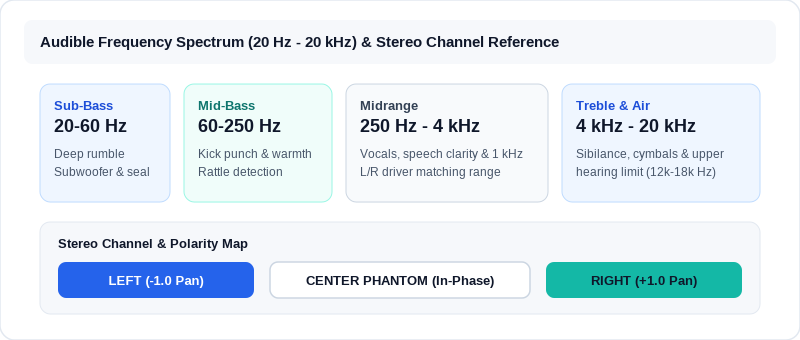
When checking upper treble roll-off on speakers or headphones, remember that both hardware design and age influence what stops sounding audible above 12 kHz. Many Bluetooth audio codecs (such as standard SBC) and small laptop speakers attenuate signals sharply past 14–16 kHz, while wide-band studio tweeters and planar headphones extend smoothly toward 20 kHz. Because normal listener sensitivity also shifts gradually with age (presbycusis), pair wired wide-band headphones with a pure Sine wave before blaming a speaker tweeter for high-frequency drop-off.
Note: This reference chart and browser tone generator are intended for speaker evaluation and informal listening checks only—they do not constitute medical audiometry or clinical hearing testing.
| Typical Age Group | Common Upper Listening Limit | Hardware & Sampling Caveats |
|---|---|---|
| Teens & Under 25 | ~17,500 Hz – 20,000 Hz | Requires wide-band headphones/speakers; small phone speakers often drop past 16 kHz |
| Adults 25 – 39 | ~15,000 Hz – 17,500 Hz | Standard Bluetooth SBC codecs frequently roll off around 15–16 kHz regardless of age |
| Adults 40 – 54 | ~12,000 Hz – 15,000 Hz | Clearly audible treble clarity on cymbals and vocal air (4–12 kHz) remains strong |
| Adults 55+ | ~8,000 Hz – 12,000 Hz | Speech intelligibility centers primarily between 300 Hz and 4,000 Hz |
Understanding Waveforms: Sine vs. Square, Triangle & Sawtooth
Selecting different waveforms during a frequency test changes harmonic structure dramatically:
- Sine Wave: Contains only the fundamental frequency (
f) with zero overtones. Always use Sine when checking speaker roll-off, room standing waves, or upper-frequency cutoffs so harmonics do not trick your ear into hearing a lower pitch. - Triangle Wave: Adds gentle odd harmonics (
3f,5f, etc.) that decay rapidly, creating a flute-like tone useful for speaker midrange checks. - Square Wave: Combines strong odd harmonics with steep vertical transitions, making it ideal for spotting speaker clipping or headphone ringing.
- Sawtooth Wave: Contains both even and odd harmonics (
2f,3f,4f, ...), yielding a bright, dense buzz often used to test audio filter roll-off.
To focus exclusively on low frequencies between 20 Hz and 250 Hz, switch to our Bass Test; to compare left and right driver clarity, use our Headphone Test or Speaker Test.
No device notes yet. Run a test above and leave the first measurement.